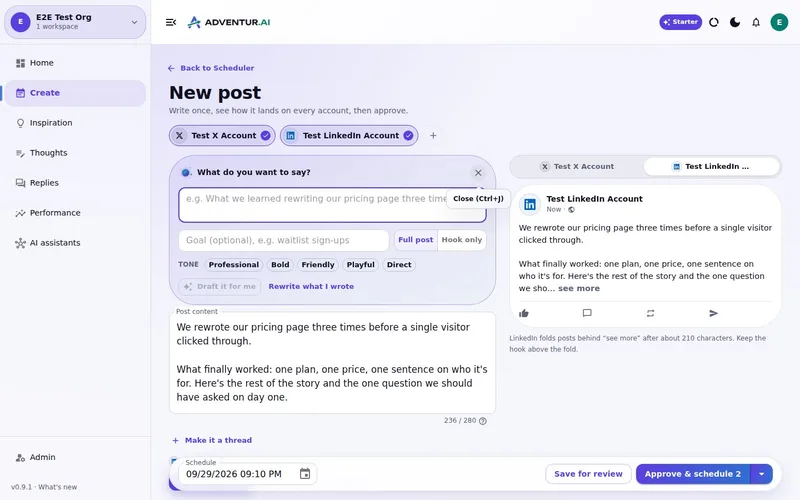
You approve every post
Whether a draft came from the app or from Claude or ChatGPT, it lands in the same Review queue, and nothing goes out until you say so.
7-day free trial · You approve every post · Works in Claude, ChatGPT or our app

Your name, your call
Handing an AI your public voice is a reasonable thing to be nervous about. The answer is not a promise that it will never make a mistake. It is making sure nothing it writes reaches the public before you have read it.
Who can do what
You
Review, edit, approve or reject every draft and every reply, in the app or in a chat with your assistant.
Your AI assistant
Reads your brand, researches topics, drafts posts and visuals into Review, and schedules or publishes only what you have approved, with the permissions you granted.
Deynix on its own
Publishes approved posts on time, drafts a few posts when your week has gaps, drafts replies if you ask it to check, and tracks results. It never publishes anything new.
Nobody
There is no delete or permission switch over MCP, and no setting that lets new content skip your approval.
You should be able to see it working
You get a morning email when drafts are waiting, a post failed or an account needs reconnecting. Approvals, schedules and publishes are recorded along with where they came from: you, your assistant or a scheduled job.
Approval is the whole design
It is how the app works, and how your assistant works through it. You never have to grant more than that.
What this
is for.
Founders who want the help but are wary of handing an AI their public voice.
Nothing goes out under your name until you have approved it.
Know exactly which jobs run on their own, and that none of them publish anything new.
Give your AI assistant only the permissions you want it to have.
Ask in the chat
you already use.
Connect Deynix to Claude, ChatGPT or Cursor and ask for the week. Your assistant uses your brand, drafts the posts and visuals, and everything waits in Review for you.
See how it connectsYou: What should I post this week? Lean on what worked last month and keep my voice. Tool call get_performance_summary: Last 30 days · 14 posts Tool call suggest_slots: 5 open slots next week Tool call create_draft_post: X + LinkedIn drafts in Review Agent: Behind-the-scenes posts did best, so the drafts lead with how you built the new feature. You: Approve both. Tool call approve_post_group: Scheduled for the best slots X post, Pending approval: We shipped the feature 40 of you asked for. Here's the 20-second version. LinkedIn post, Pending approval: The most requested feature took us three tries. What we got wrong the first two times:
Illustrative demo. Your numbers and drafts will differ.
Three steps
to your first week.
Connect the brand
Point it at your site, social history and Notion so drafts start from real context instead of a blank prompt.
Inspect what it learned
Correct positioning, audience and voice once. That correction applies to every future draft.
Approve the first batch
Scroll, edit or reject. Nothing public goes out until you approve it.
Questions, answered.
What does approval actually gate?
Every public action. Posts and replies land in Review, and nothing is scheduled or sent until you approve it. Once approved, a post publishes at its time without asking again.
Can my AI assistant approve posts?
Only if you give it the schedule permission when you connect it, and it is told to confirm the copy and time with you first. Publishing straight away needs its own separate permission, and only works on posts that are already approved.
Will it ever post on its own?
Not today. It drafts on its own when your week has gaps, and it drafts replies when you turn on automatic checking, but every one of those waits for you. A hands-off mode is something we may offer later, and only as an opt-in.
Updated 28 September 2026
Try it on
a real week.
Connect a brand, ask for a week of posts and approve the ones that sound like you. Nothing publishes until you say so.
7-day free trial · Card needed, cancel any time