Make approval a system, not a message in chat
Keep one review queue, one approved version and one enforceable rule for humans and AI assistants.
7-day free trial · You approve every post · Works in Claude, ChatGPT or our app

The job to solve
“Looks good” is ambiguous when there are several drafts, channels and collaborators. Add generated content and assistant tools, and informal approval becomes an operational risk rather than a harmless inconvenience.
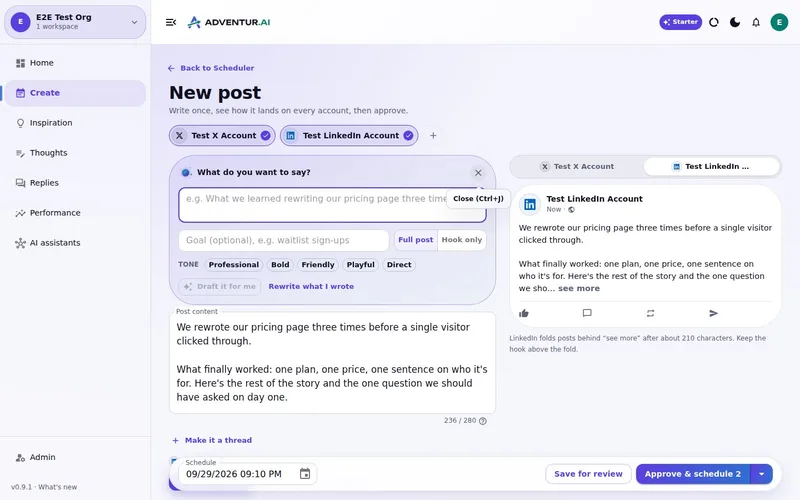
What a connected workflow changes
One review queue
Bring generated and manually created posts into the same visible decision point.
Version-safe approval
Return edited content to review so an old approval cannot silently cover new words.
Server-side enforcement
Apply the rule when scheduling and publishing, not only as a visual label in the interface.
Controlled progression
Begin approval-first and choose trusted behaviour later, after the workflow has earned confidence.
Autonomy should be earned in observable steps
Start by reviewing everything. Learn which sources, formats and prompts reliably meet the bar. Only then decide whether a narrow class of work deserves more autonomy. Deynix supports that progression without making autopilot the price of using AI.
Build a week you would be happy to publish
Bring your brand context and one real idea. Review the drafts, change what needs changing and approve only the work that earns a place in your queue.
What this
is for.
Founders and teams who want more creation help without increasing the risk of an off-brand public post.
Know which version was actually approved before it publishes.
Apply the same rules to app users and connected AI assistants.
Graduate to trusted automation only for the work you explicitly choose.
Ask in the chat
you already use.
Connect Deynix to Claude, ChatGPT or Cursor and ask for the week. Your assistant uses your brand, drafts the posts and visuals, and everything waits in Review for you.
See how it connectsYou: What should I post this week? Lean on what worked last month and keep my voice. Tool call get_performance_summary: Last 30 days · 14 posts Tool call suggest_slots: 5 open slots next week Tool call create_draft_post: X + LinkedIn drafts in Review Agent: Behind-the-scenes posts did best, so the drafts lead with how you built the new feature. You: Approve both. Tool call approve_post_group: Scheduled for the best slots X post, Pending approval: We shipped the feature 40 of you asked for. Here's the 20-second version. LinkedIn post, Pending approval: The most requested feature took us three tries. What we got wrong the first two times:
Illustrative demo. Your numbers and drafts will differ.
Three steps
to your first week.
Connect the brand
Point it at your site, social history and Notion so drafts start from real context instead of a blank prompt.
Inspect what it learned
Correct positioning, audience and voice once. That correction applies to every future draft.
Approve the first batch
Scroll, edit or reject. Nothing public goes out until you approve it.
Questions, answered.
Why does social media need an approval workflow?
Public content is hard to undo and often involves judgement about facts, tone and timing. A workflow makes that judgement visible instead of burying it in chat messages.
Can an approved post change without another review?
No. Editing approved content asks for approval again so permission belongs to the version you checked.
Is full autopilot required?
No. Approval mode is the safe starting point. Trusted mode is an explicit workspace choice for selected kinds of work, not the default.
Updated 4 October 2026
Try it on
a real week.
Connect a brand, ask for a week of posts and approve the ones that sound like you. Nothing publishes until you say so.
7-day free trial · Card needed, cancel any time