Make your expertise legible without making it generic
Turn lessons, opinions and real work into LinkedIn drafts that sound like a person with evidence \u2014 not a motivational template.
7-day free trial · You approve every post · Works in Claude, ChatGPT or our app

The job to solve
Professional audiences recognise empty authority quickly. A polished post built from vague claims is less useful than a plain post built from a specific decision, result or lesson.
What a connected workflow changes
Capture the raw thought
Save the observation when it happens instead of asking a generator to invent expertise later.
Add business context
Use your product, audience, positioning and content pillars to frame why the lesson matters.
Choose a credible format
Shape the idea as a story, breakdown, opinion or practical list according to the material.
Review the exact claim
Edit tone and factual detail before approving the draft for a LinkedIn schedule.
Credibility comes from source material
The strongest LinkedIn content usually begins inside the work: a customer pattern, a technical trade-off, a launch lesson or a belief refined by evidence. Deynix helps you capture and shape that material without pretending the AI lived it.
Build a week you would be happy to publish
Bring your brand context and one real idea. Review the drafts, change what needs changing and approve only the work that earns a place in your queue.
What this
is for.
Technical founders and subject-matter experts building trust with a professional audience on LinkedIn.
Translate specialist knowledge into clear posts without flattening the nuance.
Keep a recognisable founder voice across a consistent LinkedIn cadence.
Review and edit every generated post before it reaches the schedule.
Ask in the chat
you already use.
Connect Deynix to Claude, ChatGPT or Cursor and ask for the week. Your assistant uses your brand, drafts the posts and visuals, and everything waits in Review for you.
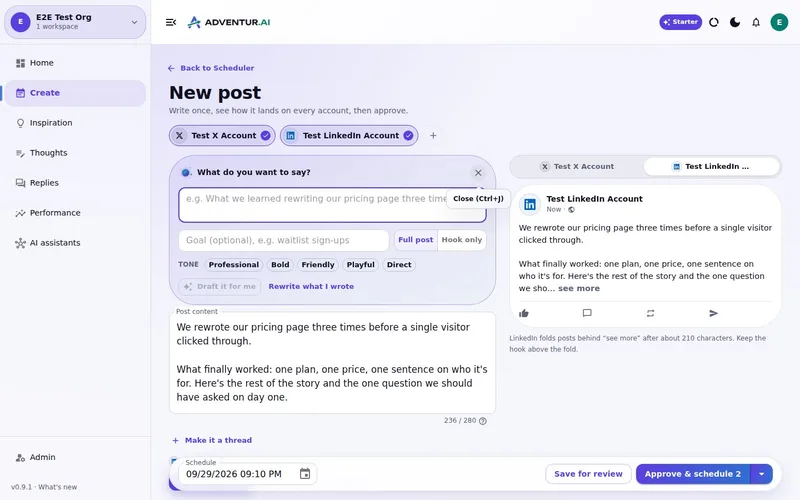
See how it connectsYou: Turn what I learned hiring our first engineer into a LinkedIn post and a carousel. Tool call list_top_posts: Story posts lead on LinkedIn Tool call create_carousel: 6-slide carousel · your brand Tool call create_draft_post: LinkedIn draft in Review Agent: The post opens with the mistake, not the lesson. The carousel is attached. Want it on Thursday morning? You: Yes, approve it. Tool call approve_post_group: Scheduled Thu 08:30 LinkedIn post, Pending approval: Our first engineering hire nearly didn't happen. I'd written the wrong job description.
Illustrative demo. Your numbers and drafts will differ.
Three steps
to your first week.
Connect the brand
Point it at your site, social history and Notion so drafts start from real context instead of a blank prompt.
Inspect what it learned
Correct positioning, audience and voice once. That correction applies to every future draft.
Approve the first batch
Scroll, edit or reject. Nothing public goes out until you approve it.
Questions, answered.
How do I stop AI LinkedIn posts sounding generic?
Give the system specific source material: what happened, what changed your mind, the trade-off you made and the evidence behind it. Durable brand voice and banned-phrase settings also reduce generic output.
Can it create posts for a company page?
LinkedIn company pages are coming soon, awaiting LinkedIn/Microsoft approval. The current workflow is for connected personal profiles and clearly labels channel availability.
Can I generate from a saved idea?
Yes. Saved thoughts and workspace context can become drafts, alongside niche research and content strategy.
Updated 4 October 2026
Try it on
a real week.
Connect a brand, ask for a week of posts and approve the ones that sound like you. Nothing publishes until you say so.
7-day free trial · Card needed, cancel any time