Protect your voice while the schedule protects your time
Batch the creation and review work, approve the exact version and let Deynix handle the publishing queue.
7-day free trial · You approve every post · Works in Claude, ChatGPT or our app
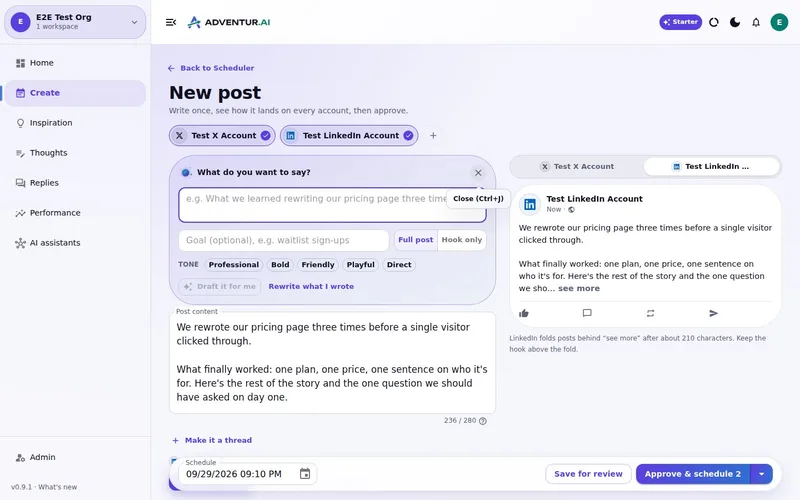

The job to solve
Consistency should not require daily context switching. But removing the daily posting task is only safe if review, version changes and publishing permissions are part of the same workflow.
What a connected workflow changes
Prepare in batches
Create several posts while the relevant ideas and source material are already in context.
Review deliberately
Use one queue to edit, reject or approve the exact version intended for your audience.
Schedule confidently
Assign approved posts to the cadence without copying text between separate tools.
Keep rules consistent
Apply the same approval checks whether work begins in the app or an AI assistant.
What works on LinkedIn in 2026
The research published this autumn points the same way. Every number links to its source, and our full write-up covers all ten habits.
- Stay in a narrow lane. LinkedIn builds a topic fingerprint for each creator and shows posts to people who engage with that topic. A focused 3,000-follower account can outperform a scattered 30,000-follower one (Work Insiders, summarising Richard van der Blom's 2026 study of 1.3 million posts).
- Post two to five times a week. Moving from one post a week to two to five added about 1,182 impressions per post across more than 2 million posts from 94,000 accounts (Buffer). Twelve months of two solid posts a week beats three months of daily posting followed by silence (Evoke).
- Use PDF carousels. LinkedIn carousels had a median engagement rate of 21.77%, about three times video and nearly seven times text-only, in Buffer's analysis of 52 million posts (Buffer).
- Hook in the first 210 characters before LinkedIn cuts the post off at "see more" (ConnectSafely).
- Keep links and hashtags out. One external link in the post body cut median reach by 18.8%, and hashtag-free posts beat hashtagged ones by 5 to 10% (Work Insiders).
- Be around to reply. About 83% of LinkedIn profiles performed better when they replied to comments (Buffer).
- Write from experience. Posts about something the writer actually did earned about 33% more reactions, and "I", "my" or "we" in the first line added about 19% (Flypost, 116,000+ posts from 2,400+ B2B creators).
- Don't batch out generic AI posts. LinkedIn added a "Seems like AI slop" report option in July 2026, and flagged posts see about 40% fewer views (Buffer).
How the LinkedIn scheduler supports it
Built for a steady, personal LinkedIn cadence
A queue for two to five a week
Batch the week's posts while the ideas are fresh, approve them, and let the queue keep the cadence going.
Carousels in your brand
Turn a list or a process into slides in your colours, fonts and logo, then post the PDF as a LinkedIn document.
Times that suit your audience
Slot suggestions use your audience, timezone, posting windows and past results, and can favour times you are around to reply.
Drafts from your own material
Drafts start from your brand context and real ideas, follow the hook, link and hashtag guidance above, and wait for your review.
A calmer cadence can produce better work
When publishing is handled, you can spend the available attention on the claims, stories and examples that make a LinkedIn post useful. The schedule should reduce operational work, not remove the editorial checkpoint.
Build a week you would be happy to publish
Bring your brand context and one real idea. Review the drafts, change what needs changing and approve only the work that earns a place in your queue.
What this
is for.
Founders and lean teams who want to batch LinkedIn work without lowering the review bar.
Move from draft to review to an approved LinkedIn schedule.
Protect approved content from unreviewed last-minute changes.
Coordinate AI-assisted creation without giving an assistant unchecked publishing access.
Ask in the chat
you already use.
Connect Deynix to Claude, ChatGPT or Cursor and ask for the week. Your assistant uses your brand, drafts the posts and visuals, and everything waits in Review for you.
See how it connectsYou: Turn what I learned hiring our first engineer into a LinkedIn post and a carousel. Tool call list_top_posts: Story posts lead on LinkedIn Tool call create_carousel: 6-slide carousel · your brand Tool call create_draft_post: LinkedIn draft in Review Agent: The post opens with the mistake, not the lesson. The carousel is attached. Want it on Thursday morning? You: Yes, approve it. Tool call approve_post_group: Scheduled Thu 08:30 LinkedIn post, Pending approval: Our first engineering hire nearly didn't happen. I'd written the wrong job description.
Illustrative demo. Your numbers and drafts will differ.
Three steps
to your first week.
Connect the brand
Point it at your site, social history and Notion so drafts start from real context instead of a blank prompt.
Inspect what it learned
Correct positioning, audience and voice once. That correction applies to every future draft.
Approve the first batch
Scroll, edit or reject. Nothing public goes out until you approve it.
Questions, answered.
Can I schedule LinkedIn posts in advance?
Yes. Approved content can be placed into your publishing schedule so the queue handles the timing.
Does scheduling work with generated posts?
Yes. Generated and manually written posts use the same review and approval states before scheduling.
Can I schedule LinkedIn carousels?
Yes. Deynix can render a carousel in your brand as a PDF, attach it to a LinkedIn post as a document, and schedule it like any other approved post.
How often should I post on LinkedIn?
Two to five times a week is the range the 2026 data supports. Buffer found that moving from one post a week to two to five added about 1,182 impressions per post. Consistency and quality matter more than hitting a daily target.
Can I publish from Claude or ChatGPT?
Connected assistants can use Deynix tools within their granted scopes. Approval settings still govern public actions.
Updated 15 October 2026
Try it on
a real week.
Connect a brand, ask for a week of posts and approve the ones that sound like you. Nothing publishes until you say so.
7-day free trial · Card needed, cancel any time