Batch a week of posts in one sitting.
One session: drafts from your context, a review queue, approve, publish. Daily blank pages are how the week disappears.
7-day free trial · You approve every post · Works in Claude, ChatGPT or our app
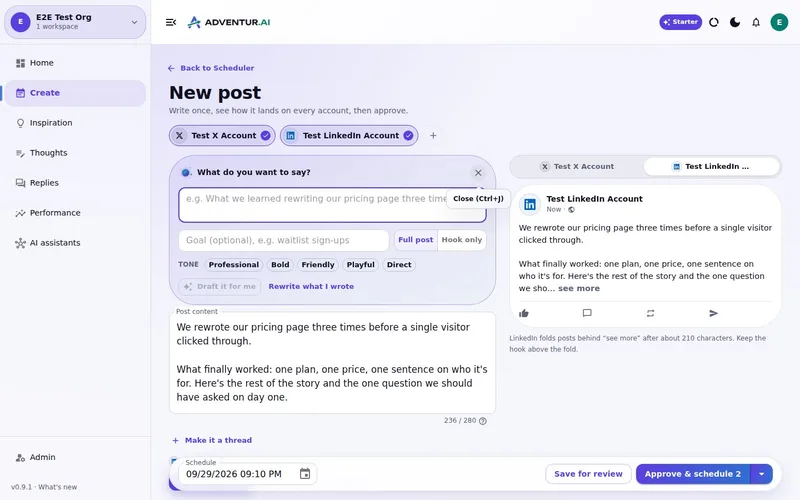

Batching is a judgement session, not a content factory
The myth is that good social requires a daily creative mood. The reality for a team of one is that daily creative moods lose to the product. Batching is how you stop negotiating with a blank box every morning.
Done badly, batching is thirty captions nobody reads, scheduled in a blur. Done well, it is one sitting where context is loaded, drafts appear, you decide, and the rest of the week does not need you at the keyboard.
The scarce resource is not words. It is consecutive attention. Spend it once.
A one-sitting loop that still has a human in it
Step 1 — Warm the context, do not start cold. Website, voice, this week's notes. If you skip this, the batch will be generic and you will reject all of it, which wastes the sitting.
Step 2 — Ask for a week, not a content empire. A handful of posts across the networks you actually use. X, LinkedIn, Facebook, Instagram and Bluesky are live. Named posts about named things. "Make me viral" is not a brief.
Step 3 — Review as a queue. Read them in order. Edit the one that overclaims. Reject the one that could be anyone's. Rewrite if the angle is right and the sentences are not. This is the job. Everything before it is setup.
Step 4 — Approve, then publish or schedule. Once the wording is yours, put it on the calendar or send it. Do not keep a second list in a spreadsheet.
That is batch create. It is closer to clearing a review inbox than to "generating content".
What the hour is actually for
You are not there to watch a model type. You are there to make a set of yes/no calls while the facts are in your head.
1. Context already loaded so you are not briefing from scratch.
2. Several drafts on the table, including ones you will refuse.
3. A single queue, so decisions do not scatter across tools.
4. A calendar that only receives what you approved.
How Deynix is built for that sitting
Deynix keeps brand context, thoughts and a Review queue in one place. You can work in the app, or from Claude, ChatGPT or Cursor through MCP. Drafts from one idea can land as a LinkedIn version and an X version together. You approve the group, or you don't.
Scheduling is live, so the sitting can end with a week that is already placed. Approval is still the default. Batching does not unlock autopilot.
It will not invent a week of case studies you did not have. It will not cross-post one caption to every live network as a feature. It will not require a multi-user approval chain to get a post out.
For the calendar view of what you just approved, see the content calendar page. For LinkedIn plus X without a duplicated caption, see how to post on both.
Spend one sitting on a real week
Load the brand, ask for the posts you already have material for, and clear Review. If the hour was useful, you have a ritual. If it was not, nothing went public.
What this
is for.
Founders and operators who can spare one focused block, not a daily writing habit.
Create a week's drafts while the context is already warm.
Move the whole batch through one Review queue.
Leave publishing as a last, boring step.
Ask in the chat
you already use.
Connect Deynix to Claude, ChatGPT or Cursor and ask for the week. Your assistant uses your brand, drafts the posts and visuals, and everything waits in Review for you.
See how it connectsYou: What should I post this week? Lean on what worked last month and keep my voice. Tool call get_performance_summary: Last 30 days · 14 posts Tool call suggest_slots: 5 open slots next week Tool call create_draft_post: X + LinkedIn drafts in Review Agent: Behind-the-scenes posts did best, so the drafts lead with how you built the new feature. You: Approve both. Tool call approve_post_group: Scheduled for the best slots X post, Pending approval: We shipped the feature 40 of you asked for. Here's the 20-second version. LinkedIn post, Pending approval: The most requested feature took us three tries. What we got wrong the first two times:
Illustrative demo. Your numbers and drafts will differ.
Three steps
to your first week.
Connect the brand
Point it at your site, social history and Notion so drafts start from real context instead of a blank prompt.
Inspect what it learned
Correct positioning, audience and voice once. That correction applies to every future draft.
Approve the first batch
Scroll, edit or reject. Nothing public goes out until you approve it.
Questions, answered.
Can I batch create a week of posts in Deynix?
Yes. Load the brand once, ask for several drafts from real notes, review them together, approve, then schedule or publish. That is the intended weekly ritual.
Does batching mean identical posts on every network?
No. Ask for channel-aware drafts. LinkedIn and X should not share a caption. See the guide on posting to both without copying.
Which channels can I batch for?
X, LinkedIn, Facebook, Instagram and Bluesky are live. Batch only those. Coming-soon networks are not part of this workflow yet.
Updated 19 October 2026
Try it on
a real week.
Connect a brand, ask for a week of posts and approve the ones that sound like you. Nothing publishes until you say so.
7-day free trial · Card needed, cancel any time