An AI marketing employee for a team of one.
Drafts come from stored business context. You approve. Then it publishes. Not a blank scheduler, and not a hire you have to manage.
7-day free trial · You approve every post · Works in Claude, ChatGPT or our app

The actual job when you are the team
If you run a small business, social media is rarely the problem. Time is. The offer is clear in your head. The photos exist. The week still goes quiet because writing a post sits behind customers, payroll and the work itself.
A blank scheduler does not fix that. It gives you empty slots and a blinking cursor. A freelancer can help, then you spend the hour briefing them, then you still read every caption because it is your name on the door.
What you need is closer to an employee who already works here. They know the class times, the product, the tone you use with customers. They put a draft in front of you. You change a sentence or you don't. Then it goes out.
That is the job an AI marketing employee can take on. It is not "set and forget". It is "stop starting from nothing".
How to run social as a team of one
Do this once, then keep a short weekly ritual.
Write down the business, not a prompt. What you sell, who it is for, what you refuse to sound like. If that lives only in your head, every tool will guess. Point Deynix at your website, add a Notion page or a short brief, and correct the voice once. That correction applies to the next draft, not just this one.
Pick a cadence you can approve, not a cadence you wish you had. Three honest posts a week beat fourteen skipped ones. LinkedIn, X, Instagram, Facebook Pages and Bluesky are live today. Use the networks your customers already open. Leave the rest.
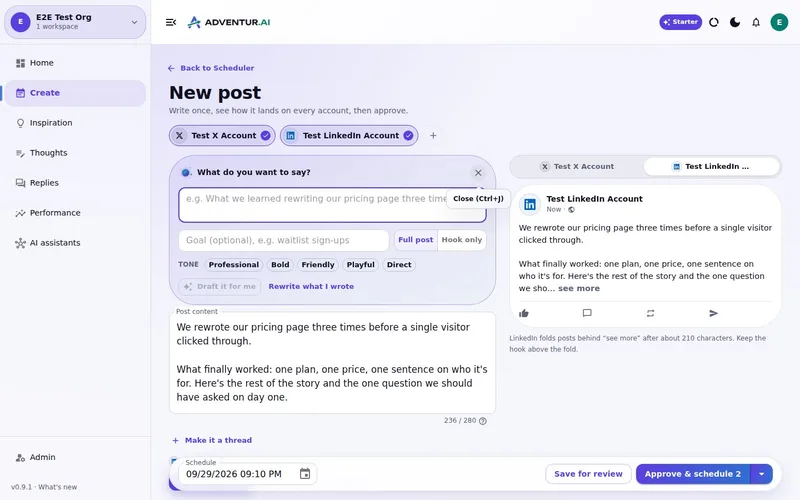
Batch the week. Sit down once. Ask for posts about a real thing: a new offer, a customer lesson, a behind-the-scenes note. Read them in Review. Edit the claim that is too strong. Reject the one that sounds like a brochure. Approve the rest.
Let publishing be the last step. After approval, schedule the post or publish it. Do not invent a second workflow in another app.
That loop is the whole system. Research, a pretty caption and a calendar are only useful if they still work on a Tuesday when you have forty minutes.
What changes when the context is stored
The business is already loaded
Your site, voice and notes sit in the workspace. You are not pasting a bio into a chat every Monday.
Drafts arrive as a queue
You review, edit or reject. The work is judgement, which is the part only you can do.
Approval is the gate
Nothing public moves until you say so. That is the default, not an extra setting you have to hunt for.
The same loop from the app or your assistant
Work in Deynix, or connect Claude, ChatGPT or Cursor. The Review queue is the same either way.
Where Deynix fits, and where it does not
Deynix is an AI marketing employee for indie hackers, technical founders and lean teams. For a small business that means: learn the brand, draft the posts, wait, publish.
It does not replace you. It does not run ads. It does not promise a number of followers. It does not post replies on your behalf as a bot. It does not pretend TikTok, YouTube or LinkedIn company pages are live when they are still waiting on platform approval.
If you want a wall of scheduled filler, this is the wrong tool. If you want a week of posts that still sound like the person who owns the place, start with context, then a Review queue.
The first test is short. Connect the brand. Ask for a real week. Read the drafts. You will know in one sitting whether it is usable.
Related: approval before publish, batch a week of posts, and the small business page.
Give it a real week, not a demo prompt
Point it at your site, ask for posts you would actually send, and approve the ones that sound like you. Nothing publishes until you say so.
What this
is for.
Owners and founders running a small business without a marketing hire, who still need a public presence they would stand behind.
Stop pasting your offer into a new chat every time you need a post.
Review a week's drafts in one sitting instead of writing from a blank box.
Keep the public voice yours: nothing goes out until you approve it.
Ask in the chat
you already use.
Connect Deynix to Claude, ChatGPT or Cursor and ask for the week. Your assistant uses your brand, drafts the posts and visuals, and everything waits in Review for you.
See how it connectsYou: Posts for the new 6am class, a member shout-out and the January offer. Instagram and Facebook. Tool call get_brand_kit: Colours, fonts and logo loaded Tool call create_carousel: 5-slide carousel · portrait Tool call create_draft_post: 3 drafts in Review Agent: Three drafts are ready with images on your brand. Nothing goes out until you approve. You: Looks good. Approve them. Tool call approve_post_group: Scheduled Mon, Wed, Fri Instagram post, Pending approval: New: 6am strength, Monday to Friday. Come in before work, leave ready for it. Facebook post, Pending approval: January offer: bring a friend free for their first month.
Illustrative demo. Your numbers and drafts will differ.
Three steps
to your first week.
Connect the brand
Point it at your site, social history and Notion so drafts start from real context instead of a blank prompt.
Inspect what it learned
Correct positioning, audience and voice once. That correction applies to every future draft.
Approve the first batch
Scroll, edit or reject. Nothing public goes out until you approve it.
Questions, answered.
What is an AI social media manager for a small business?
A system that already knows your business, drafts posts in that context, and waits for you before anything is public. Deynix is built as an AI marketing employee for that job, not as a blank scheduler you still have to fill.
Will it post without me?
No. Approval is the default. Every draft sits in Review until you approve it. Scheduling happens after that, not instead of it.
Which networks can a small business post to?
X, LinkedIn, Facebook, Instagram and Bluesky are live. Coming-soon networks are labelled as such in the product and are not treated as available here.
Do I need Claude or ChatGPT to use it?
No. The Deynix app covers the same loop. If you already work in Claude, ChatGPT or Cursor, you can connect the MCP server and run the same drafts and approvals from that chat.
Updated 19 October 2026
Try it on
a real week.
Connect a brand, ask for a week of posts and approve the ones that sound like you. Nothing publishes until you say so.
7-day free trial · Card needed, cancel any time