Nothing publishes until you approve it.
A solo review step by default. Drafts can come from you, from the app, or from an assistant. The public web still needs your yes.
7-day free trial · You approve every post · Works in Claude, ChatGPT or our app

Approval is not bureaucracy. It is how you keep your name.
Most social tools treat "approval" as a status label. A checkbox. A Slack emoji. Then the post goes out anyway because someone had schedule-permission in another tab.
If an AI is going to draft under your name, that is not enough. The rule has to sit in front of publishing, not next to it.
The shape that works for a founder:
- There is one queue of things that want to be public.
- You can read the exact words.
- You can change them, refuse them, or accept them.
- Only then can the post occupy a time on the calendar, or go out now.
- A later edit returns it to you. An old yes does not cover new copy.
That is a social media tool with an approval workflow. It is not a legal department. It is not five people in a chain. It is you, because it is your name.
How to use an approval workflow without slowing the week to a halt
Batch the incoming drafts. Approval dies when it is twenty interruptions. It lives when it is one sitting. See batch create social media posts.
Approve versions, not ideas. "Yes, talk about the pricing change" is not approval. The sentences are. If the draft drifts, the yes is void until you read the new one.
Keep the gate identical for humans and assistants. If Claude can bypass Review by calling a different tool, you do not have a workflow. You have a hope. Deynix applies the same rule in the app and through MCP.
Do not build a fake committee. Extra approvers sound grown-up. For a team of one they are delay. If you are not a company with a comms team, you want a solo step that is hard to skip, not a chain that is easy to rubber-stamp.
Let scheduling happen after the yes. Schedule LinkedIn posts in advance only once the wording is the wording you accepted.
What the workflow has to make true
Private by default
A generated post is a file on your desk, not a public statement. Review is that desk.
One obvious decision
Approve, edit, reject. If those are scattered across chats, the decision did not happen.
The same rule everywhere
App, assistant, schedule, post now. A back door in any of them is the real policy.
A yes that belongs to a version
Change the words, ask again. Otherwise 'approved' is a mood, not a fact.
How Deynix implements the gate
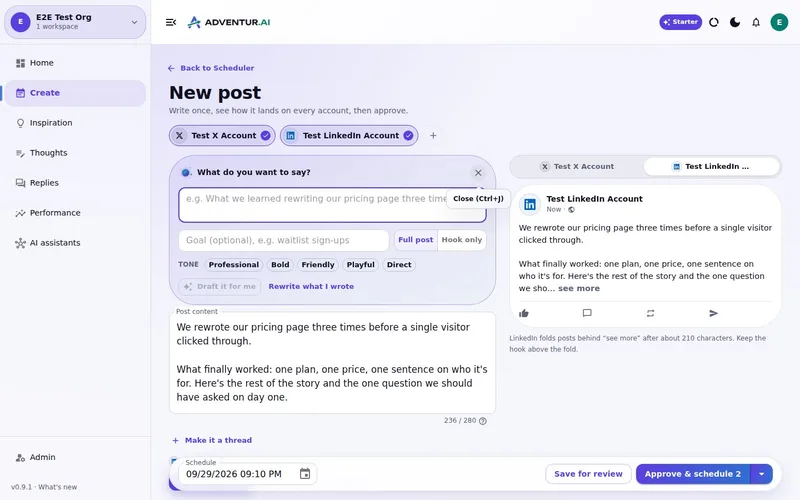
Approval mode is the default. Drafts from the composer, from saved thoughts, from a connected assistant, all wait in Review. Approving can schedule the post. Post now still requires that the post is already approved. Editing sends it back.
Deynix is an AI marketing employee with that gate in front of the public. It will help you produce. It will not take your name in vain as a default.
This is not full autopilot. This is not an engagement bot. This is not an enterprise approval matrix. If you need ten people to sign a tweet, you need a different product. If you need a hard stop before a draft becomes your voice, this is the stop.
More on the control model: approval and control. For the small-business version of the same employee, see an AI marketing employee for a team of one.
Connect a brand and read the first queue
The test is not whether it can write. The test is whether you can refuse a draft and nothing happens in public. That is the workflow.
What this
is for.
Founders and lean operators who want help drafting, and a hard stop before anything is public.
Know that a draft is private until you approve the exact wording.
Apply the same gate to the app and to a connected assistant.
Keep approval as one person's job, not a committee product.
Ask in the chat
you already use.
Connect Deynix to Claude, ChatGPT or Cursor and ask for the week. Your assistant uses your brand, drafts the posts and visuals, and everything waits in Review for you.
See how it connectsYou: What should I post this week? Lean on what worked last month and keep my voice. Tool call get_performance_summary: Last 30 days · 14 posts Tool call suggest_slots: 5 open slots next week Tool call create_draft_post: X + LinkedIn drafts in Review Agent: Behind-the-scenes posts did best, so the drafts lead with how you built the new feature. You: Approve both. Tool call approve_post_group: Scheduled for the best slots X post, Pending approval: We shipped the feature 40 of you asked for. Here's the 20-second version. LinkedIn post, Pending approval: The most requested feature took us three tries. What we got wrong the first two times:
Illustrative demo. Your numbers and drafts will differ.
Three steps
to your first week.
Connect the brand
Point it at your site, social history and Notion so drafts start from real context instead of a blank prompt.
Inspect what it learned
Correct positioning, audience and voice once. That correction applies to every future draft.
Approve the first batch
Scroll, edit or reject. Nothing public goes out until you approve it.
Questions, answered.
What does an approval workflow mean here?
Every draft waits in Review. Scheduling and posting only happen after you approve that version. If you edit an approved post, it needs approval again.
Is this a multi-user approval chain?
No. The default is a solo review step: you read it, you say yes or no. Deynix is built for a team of one and lean teams, not an enterprise chain of managers.
Can I turn approval off?
Approval is the default and the way this page describes the product. Nothing on this page is a promise of full autopilot.
Updated 19 October 2026
Try it on
a real week.
Connect a brand, ask for a week of posts and approve the ones that sound like you. Nothing publishes until you say so.
7-day free trial · Card needed, cancel any time