An AI content calendar you approve before anything publishes.
A planned queue of posts for the channels that are live. You still say yes to each one. Not a month of filler dropped onto empty squares.
7-day free trial · You approve every post · Works in Claude, ChatGPT or our app

A calendar is not a strategy. An unreviewed calendar is a liability.
Search "AI content calendar generator" and you will find tools that spray thirty captions onto a grid. That solves the fear of empty squares. It does not solve the fear of publishing something you would not say.
A useful calendar has three properties.
It is planned: you can see what is coming, in a week you can actually scan. It is sourced: each post points at your business, not at a generic prompt for "Monday motivation". It is gated: nothing on that grid is public until a person accepts the wording.
If any of those is missing, you either go quiet or you ship filler. Both are worse than a smaller calendar.
How to run a calendar you would still sign
Start from pillars and a cadence, not from dates. What you are allowed to talk about, and how often you can approve. Then the week has a job.
Generate a short backlog, not a quarter. A week of drafts from stored context is a calendar. A generated October is a novel nobody will edit.
Park everything in Review first. The calendar of scheduled posts should only contain work that already passed. Empty slots are fine. Unread copy in a public slot is not.
Fill gaps on purpose. If a day is light, draft from a saved thought or a niche note you actually have. Deynix can suggest candidates for empty coverage. You still approve.
Look at the week as a week. Scheduled posts grouped by day, in your timezone, with each connected account visible. That is the calendar worth opening on Monday.
What this is not: a one-shot "plan my whole week" button that dreams a full slate from a single prompt. That assistant flow is on the roadmap. Today the working version is drafts plus a queue plus a calendar of what you already approved.
What belongs on the grid
Live channels only
Today that is X, LinkedIn, Facebook, Instagram and Bluesky. If a network is not live, it does not belong in the promise of this page.
Posts with a reason
A pillar, a note, a product lesson. A square filled for completeness will read like it.
A visible state
Idea, draft, waiting, approved, scheduled. If you cannot tell them apart, you will schedule the wrong one.
Room to refuse
A generator that cannot be rejected is not a calendar. It is an autopilot, and this product is not that.
How Deynix implements the honest version
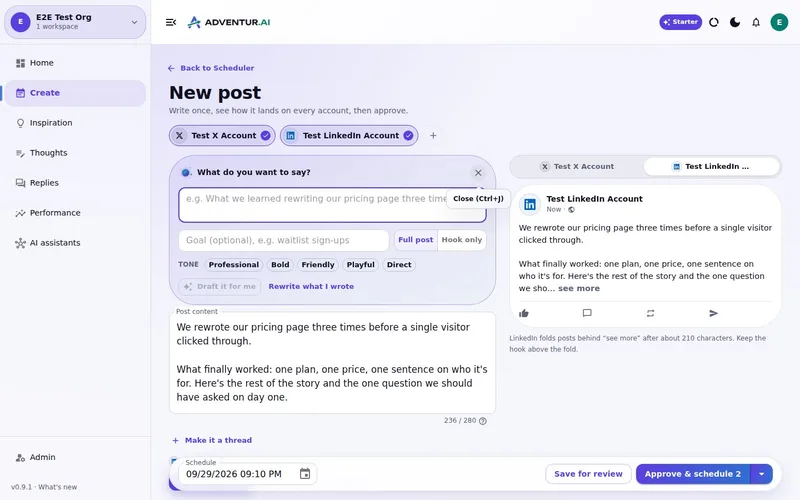
The scheduler is live: a queue and a calendar of scheduled posts, grouped by day, every connected account on screen. Drafts come from brand context, thoughts and the plan you confirmed. Approval mode keeps them private until you say so.
Use it as an AI marketing employee that prepares the week, then waits. Do not use it as a machine that owes you thirty posts because the month has thirty days.
Related: batch create social posts, schedule LinkedIn in advance, approval workflow.
Build a week, not a fictional quarter
Ask for a handful of posts you would actually run. Approve them. Then look at the calendar. If a day is empty, that is information, not a failure.
What this
is for.
Founders and small teams who want a week they can see, not a generated month they would never read.
See drafts, waiting posts and scheduled posts as a week you can scan.
Fill gaps from real context, then approve before a slot is occupied.
Use only the networks that are actually live today.
Ask in the chat
you already use.
Connect Deynix to Claude, ChatGPT or Cursor and ask for the week. Your assistant uses your brand, drafts the posts and visuals, and everything waits in Review for you.
See how it connectsYou: What should I post this week? Lean on what worked last month and keep my voice. Tool call get_performance_summary: Last 30 days · 14 posts Tool call suggest_slots: 5 open slots next week Tool call create_draft_post: X + LinkedIn drafts in Review Agent: Behind-the-scenes posts did best, so the drafts lead with how you built the new feature. You: Approve both. Tool call approve_post_group: Scheduled for the best slots X post, Pending approval: We shipped the feature 40 of you asked for. Here's the 20-second version. LinkedIn post, Pending approval: The most requested feature took us three tries. What we got wrong the first two times:
Illustrative demo. Your numbers and drafts will differ.
Three steps
to your first week.
Connect the brand
Point it at your site, social history and Notion so drafts start from real context instead of a blank prompt.
Inspect what it learned
Correct positioning, audience and voice once. That correction applies to every future draft.
Approve the first batch
Scroll, edit or reject. Nothing public goes out until you approve it.
Questions, answered.
Does Deynix generate a content calendar?
It drafts posts from your context and holds them in a queue and calendar grouped by day. You approve each one before it occupies a public slot. It does not fill a blank month with unreviewed filler, and one-prompt 'plan my whole week' is still planned, not shipped.
Which channels appear on the calendar?
X, LinkedIn, Facebook, Instagram and Bluesky are live. Coming-soon channels are not listed here as available.
Can I change the cadence?
Yes. Your plan and schedule are workspace settings. The useful calendar is the one whose volume you can still approve.
Updated 19 October 2026
Try it on
a real week.
Connect a brand, ask for a week of posts and approve the ones that sound like you. Nothing publishes until you say so.
7-day free trial · Card needed, cancel any time