LinkedIn posts with AI that still sound like you.
Project context plus a human pass before publish. A one-shot prompt will write something. It will not write you.
7-day free trial · You approve every post · Works in Claude, ChatGPT or our app

Why one-shot prompts sound like everyone else
Ask a general chatbot for a LinkedIn post about leadership and you get the same shape every time. A hook about "the hard truth". Three numbered lessons. A humble closer. It is fluent. It is also empty, because the model had no specific thing to protect.
Readers on LinkedIn are good at spotting that. They have seen the same cadence from a thousand accounts. The tell is not "perfect grammar". The tell is that nothing in the post required you, specifically, to have been in the room.
AI is useful on LinkedIn when it is a drafting layer on top of your material. It is harmful when it is asked to invent the material too.
How to write a LinkedIn post with AI that still sounds like you
Start with an artefact, not a theme. A decision you made this week. A customer sentence you keep hearing. A mistake you would make again, or would not. One paragraph in your notes is enough. "Write a thought-leadership post about hiring" is not.
Put that artefact next to durable context. Who you are, who you sell to, phrases you never use. If the model has to guess your product, it will guess a generic SaaS. Deynix keeps that context in the workspace so you are not pasting it into a new chat.
Ask for a draft in your register. Short sentences if you write short sentences. Concrete nouns. No "delve", no "landscape", no lesson that could apply to any company. If your real voice is dry, the draft should be dry.
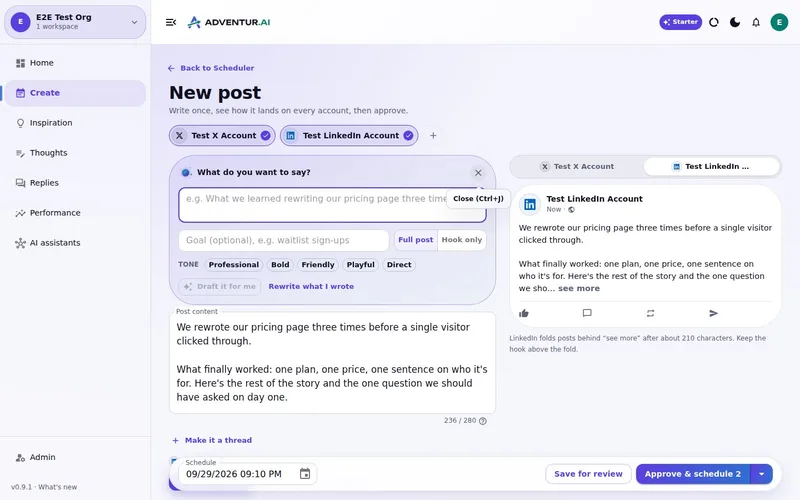
Do a human pass before anything is public. Read it out loud. Cut the sentence you would never say. Fix the claim that overreaches the evidence. Keep the odd detail that only you would know. That pass is the product. Skip it and you are publishing a stranger.
Approve, then schedule or post. The order matters. If scheduling comes first, you will ship the fluent version because it is already on the calendar.
What a human pass is actually for
Protect the claim
AI will round a cautious observation into a slogan. You put the caution back.
Protect the voice
Banned phrases and examples help, but your ear is the last filter. If it sounds like a keynote, cut it.
Protect the evidence
A post that cites a thing you did will beat a post that cites a feeling you had. Keep the thing.
Protect the name on the profile
LinkedIn is a professional identity. Approval is how you refuse to outsource that identity.
How Deynix fits this, without pretending it lived your week
Deynix is an AI marketing employee. It learns your brand from the site, from Notion, from thoughts you save. It drafts a LinkedIn post from that, in a shape that belongs on LinkedIn, not a caption copied from X. The draft waits in Review. You edit. You approve. Then it can be scheduled.
It will not make you sound human if you feed it nothing human. Garbage in is still fluent garbage. The honest workflow is: capture the raw note when it happens, let the system shape it, then take the last pass yourself.
It also will not ghostwrite a personal brand you never see. If you are not reading the queue, do not turn it on. The point of approval is that you are still the author of record.
For the weekly version of this, see founder-led LinkedIn and personal-brand posts for founders. For the scheduling step that comes after the pass, see schedule LinkedIn posts in advance.
Try it on a post you would actually send
Bring one real note from this week. Read the draft. If it does not sound like you, that is useful information, and nothing has gone public yet.
What this
is for.
Founders and operators who want AI help on LinkedIn without sounding like a template.
Start from something you actually did, not a motivational prompt.
Keep a voice pass as a required step, not a nice-to-have.
Reject or edit any line you would not say out loud.
Ask in the chat
you already use.
Connect Deynix to Claude, ChatGPT or Cursor and ask for the week. Your assistant uses your brand, drafts the posts and visuals, and everything waits in Review for you.
See how it connectsYou: Turn what I learned hiring our first engineer into a LinkedIn post and a carousel. Tool call list_top_posts: Story posts lead on LinkedIn Tool call create_carousel: 6-slide carousel · your brand Tool call create_draft_post: LinkedIn draft in Review Agent: The post opens with the mistake, not the lesson. The carousel is attached. Want it on Thursday morning? You: Yes, approve it. Tool call approve_post_group: Scheduled Thu 08:30 LinkedIn post, Pending approval: Our first engineering hire nearly didn't happen. I'd written the wrong job description.
Illustrative demo. Your numbers and drafts will differ.
Three steps
to your first week.
Connect the brand
Point it at your site, social history and Notion so drafts start from real context instead of a blank prompt.
Inspect what it learned
Correct positioning, audience and voice once. That correction applies to every future draft.
Approve the first batch
Scroll, edit or reject. Nothing public goes out until you approve it.
Questions, answered.
Why do AI LinkedIn posts sound fake?
Most of them start from a one-shot prompt with no memory of your work. The model fills the gaps with polished generalities. Stored context and a human pass before publish are what keep a post sounding like a person.
Should I tell people a post was drafted with AI?
Your name is on it, so the standard is the same as anything you publish: you stand behind the claim. Review the draft as if you typed it. If you would not send it, do not approve it.
Can Deynix write in my voice automatically?
It learns from your site, writing and saved thoughts, then drafts from that. You still read it. If a phrase is not yours, edit or reject it. The voice is yours because you keep the last pass.
Updated 19 October 2026
Try it on
a real week.
Connect a brand, ask for a week of posts and approve the ones that sound like you. Nothing publishes until you say so.
7-day free trial · Card needed, cancel any time